


There’s a weird thing about the internet right now — everything is fast, but also somehow… annoyingly slow. You click download, and boom, ten popups. You close one, two more show up. That’s kind of where tools like Snapgram sneak in and quietly do their job without making a scene.
If you’ve ever tried saving content from Instagram, you already know the struggle. You see a Reel you want to keep, or a Story that’s going to vanish in 24 hours, and suddenly you’re jumping between sketchy websites that look like they were made in 2009. Not ideal, honestly.
This review isn’t trying to oversell anything. It’s simply a proper look at Snapgram — both an Instagram video downloader and an IG Story viewer: what it does, how it performs, and whether it actually makes things easier… or just pretends to.
What Is Snapgram?
Snapgram is basically a browser-based Instagram downloader. But saying it like that makes it sound more boring than it is. It’s one of those tools that strips things down to almost nothing — no login, no ads, no weird redirects that make you question your life choices.
For example, if you want to download a post, you just need to copy and paste the post link into its Instagram post downloader, and it will give you the file. That’s it. No ceremony.
What makes it stand out a bit is that it doesn’t try to split features into ten different tools. You don’t need one downloader for Reels, another for Stories, and something else for profile pictures. It’s all sitting in one place, which feels… surprisingly rare now.
And yeah, it runs entirely in your browser. No installs, no APK hunting unless you want their Android app. Works on phones, laptops, whatever you’ve got lying around.
Key Features of Snapgram Instagram Downloader
Instagram Video Downloader
Saving videos from Instagram usually comes with a tradeoff — either speed or quality. Snapgram kinda ignores that tradeoff completely.
You paste a Reel or video link, and within seconds, it’s ready. Not “loading… almost there…” fake seconds, but actual seconds.
What stands out:
● Downloads Reels and standard videos
● Keeps original resolution (up to what Instagram allows)
● Saves as MP4 with audio intact
● No watermark slapped on top later
There’s something oddly satisfying about getting the exact same video you saw, just offline now. No weird compression, no blurry nonsense.
Instagram Story & Highlights Downloader
Stories are tricky because they disappear. And Highlights feel permanent until they suddenly aren’t.
Snapgram handles both in a way that feels… almost too simple.
Instead of just grabbing one Story, it shows all active Stories from that profile when you paste a link. This is actually kind of useful, even if you didn’t expect it.
Features worth noting:
● Download Stories before they expire
● Access entire Highlights collections
● Save videos with music fully intact
● View Stories anonymously (this one’s lowkey powerful)
And yeah, the anonymous viewing thing works without logging in. You don’t show up in anyone’s viewer list, which is either convenient or slightly mischievous depending on how you use it.
Instagram Photos Downloader
Photos are probably the easiest thing to download, but also the easiest to mess up. A lot of tools compress images so badly they look like they’ve been through five WhatsApp forwards.
Snapgram doesn’t do that.
● Supports single posts and carousels
● Downloads in original quality
● Saves as JPG without loss
It’s one of those features you don’t think about until you compare results side by side. Then it becomes obvious.
Instagram DP Downloader & Viewer
Profile pictures on Instagram are weirdly tiny. You can’t zoom properly, and screenshots just make things worse.
Snapgram solves that in a very straightforward way:
● View profile pictures in full size
● Download them without distortion
● No login required
It’s a small feature, but people use it more than you’d think. Especially when you’re trying to actually see a profile image clearly.
How to Use Snapgram to Download Instagram Videos and Photos?
This part is honestly so straightforward it almost feels like there should be more steps, but there aren’t.
1. Copy the Story, video or reel link
Open Instagram, find whatever you want — Story, Reel, post, doesn’t matter. Simply copy the link from the browser URL area.
Nothing fancy here. Just copy it.
2. Paste it into Snapgram
Go to the Snapgram website and paste the link into the search box.
That’s literally all you need to do. No signup screen suddenly appearing, no “verify you’re human” puzzles.
3. Preview the Stories and download
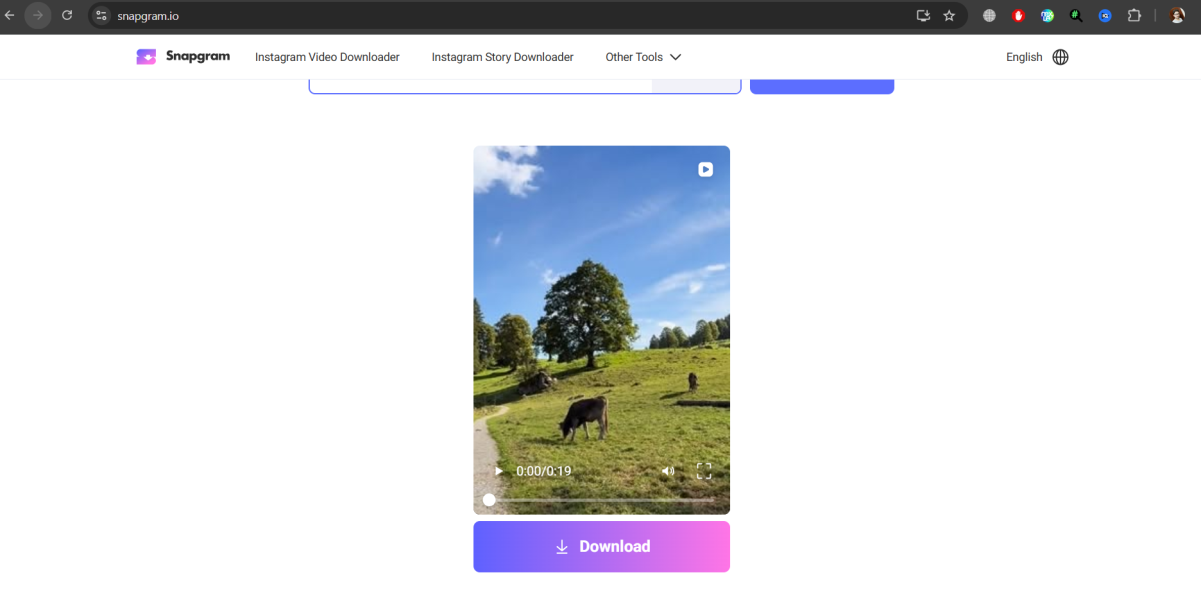
Here’s where it gets slightly interesting.
Instead of just showing the one item, Snapgram often displays all available content from that link source (especially for Stories). You can scroll, pick what you want, and hit download.
Files save instantly as MP4 or JPG/WebP. No watermark quietly added later. No fake progress bars that never end.
It just gives you the file and lets you move on, which feels… weirdly refreshing.
Final Thoughts
Snapgram doesn’t try to reinvent anything. And maybe that’s exactly why it works.
There’s no dashboard, no account system, no “premium version unlock” nonsense. It’s just a clean, ad-free Instagram downloader that does what it says without dragging you through extra steps.
A few things that actually matter:
● It’s completely free with no limits
● Works on any device with a browser
● Doesn’t store your data or require login
● Keeps original file quality intact
Of course, it’s not perfect in every possible way. For example, it doesn’t support downloading from private accounts, which honestly makes sense from a privacy standpoint. And you still need a link for Stories instead of just a username, though that feature is apparently in development.
But for everyday use, especially if you’re someone who just wants to save content quickly without dealing with ads or clutter, Snapgram feels like one of those tools you end up bookmarking and not thinking about again.
And maybe that’s the best kind of tool there is.




